How to Add VAST Ads to WordPress Videos (Pre-roll, Mid-roll, Post-roll) — Complete Guide 2026
You’ve built a solid video library on your WordPress site. You have real traffic. And somewhere in the back of your mind you’re thinking — how do I actually make money from these videos without handing everything over to YouTube?
The answer is VAST ads. And if you haven’t heard of VAST before, or you have but don’t know how to implement it on WordPress, this guide takes you from zero to running live pre-roll, mid-roll, and post-roll ads on your videos — without touching a single line of code.
VAST stands for Video Ad Serving Template. It’s an XML-based standard maintained by the IAB (Interactive Advertising Bureau) that defines how video ads are requested, delivered, and tracked between an ad server and a video player.
In plain English: VAST is the universal language that lets any ad network talk to any compliant video player. When your player needs to show an ad, it sends a request to a VAST URL. The ad server responds with an XML file that tells the player what ad to show, how long it lasts, whether it’s skippable, what tracking pixels to fire, and where to send the viewer if they click.
This is why VAST matters: it’s not a proprietary format tied to one ad network. It works with Google Ad Manager, Google AdSense for Video, FreeWheel, SpotX, AppNexus, and hundreds of other programmatic platforms. If you build your video monetization around VAST, you’re not locked in anywhere.
You’ll see these terms together and it’s worth understanding each:
VAST — the core standard. Handles linear video ads (pre-roll, mid-roll, post-roll) and non-linear overlays (banner ads within the player).
VPAID (Video Player-Ad Interface Definition) — an older extension for interactive JavaScript-based ads. VPAID is being phased out due to security concerns and is increasingly blocked. Treat it as legacy tech.
VMAP (Video Multiple Ad Playlist) — a VAST extension that defines multiple ad breaks across a single video in one XML file. Used when you want to pre-define exactly where every ad break occurs. More common on professional publisher setups.
For a standard WordPress site in 2026, VAST is what you need — the safest, most widely supported, and most future-proof format.
Understanding where your ads appear is foundational to your monetization strategy.
A pre-roll ad plays before your main video content begins. The viewer sees the ad, then the video starts.
Pre-rolls are usually triggered right after the user hits play, using a VAST tag or a pre-configured ad break in your video player. What matters most is ensuring the ad feels like part of the viewing flow, not a delay.
Why pre-roll works: The viewer has just expressed intent by clicking play. Their attention is at its peak. Completion rates are strong because viewers are motivated to get to the content they came for.
Best for: Any video length. Pre-roll is the most universally applicable format — it works on a 30-second product demo and a 2-hour webinar alike.
Skippable vs. non-skippable: Non-skippable pre-rolls (15 seconds or less) have higher completion rates. Skippable pre-rolls (skippable after 5 seconds per Google’s standard) offer better UX but lower completion.
A mid-roll ad interrupts the video at a specific timestamp — like a commercial break on TV. These ad slots work best when viewers are already invested in what they’re watching. That emotional buy-in makes them more likely to sit through the interruption and resume playback, which translates to stronger completion rates and higher CPMs.
Why mid-roll works: A viewer who is 10 minutes into your tutorial is deeply engaged. The interruption is acceptable because they’ve already committed to the content.
Best for: Long-form content — tutorials over 10 minutes, webinars, course lessons, documentary-style videos. Mid-roll is rarely appropriate for videos under 5–7 minutes.
Timing matters enormously. Don’t place mid-rolls at random timestamps. Put them at natural pause points: between sections, after a conclusion, before a new topic begins. A mid-roll that cuts someone off mid-sentence kills the experience.
A post-roll ad plays after the main video content ends.
Why post-roll works: Viewers who watch to the end are your most engaged audience. They’re in a neutral state — not interrupted, not anticipating anything specific. Post-roll ads feel less intrusive than mid-roll.
The trade-off: Post-rolls are less intrusive but often ignored. Many viewers click away the moment a video ends. Completion rates are lower than pre-roll or mid-roll, but CPM rates can still contribute meaningfully on high-volume sites.
Best for: Sites with high viewer loyalty — educational platforms, course libraries, brand video hubs where viewers regularly complete full videos.
In addition to the three linear formats, VAST supports non-linear overlay ads — image banners or text/link cards that appear over the video at configurable positions without interrupting playback. Less intrusive than linear ads and can be layered alongside any of the above.
This question deserves a direct answer. If you embed YouTube videos, YouTube already runs ads on them through the Partner Program. Why bother with VAST yourself?
You keep more revenue. YouTube’s revenue share gives creators approximately 55%. With direct programmatic VAST via Google Ad Manager, you access higher CPM rates and keep a larger share. Self-hosted video revenue can be 3–10x higher than YouTube revenue when you bring in competing ad demand outside Google’s ecosystem.
You control the ad experience. YouTube decides which ads run on your content. Competitor ads can and do appear on your videos. With your own VAST setup, you choose which ad networks are permitted and can block any categories you don’t want associated with your brand.
YouTube can demonetize you overnight. Policy changes, content ID disputes, and algorithm updates have ended monetization for creators without warning or clear explanation. Running your own VAST ads on self-hosted or external video sources means your revenue doesn’t depend on YouTube’s review systems.
You can monetize non-YouTube content. Your Vimeo embeds, TikTok embeds, self-hosted MP4s, and HLS streams can all carry VAST ads if you use a VAST-capable player — something YouTube’s system simply cannot cover.
To run VAST ads, you need a VAST ad tag URL — a URL that points to an ad server and returns ad content when your player requests it.
Google Ad Manager (GAM) — the professional-grade option. Free to use. You set up ad units, connect demand partners (Google AdSense, programmatic networks), and GAM generates VAST tag URLs for you. High CPM potential but requires initial setup.
Google IMA SDK test tags — Google provides sample VAST tags at googleads.github.io/googleads-ima-html5/vsi/ for testing. Use these to verify your player is working correctly before switching to live tags.
Programmatic ad networks — SpotX, Magnite, OpenX, Teads, and others provide VAST tags for publishers who meet traffic thresholds. CPMs vary significantly by niche and geography.
Direct ad deals — if you have meaningful traffic, brands in your niche may approach you directly. A direct sponsorship VAST tag bypasses all network fees and commands premium CPMs. You create a VAST tag that serves a specific advertiser’s video ad.
For most WordPress sites starting out, Google Ad Manager is the right starting point — free, scalable, and connected to the full Google demand ecosystem.
MediaHaven Pro includes a complete, natively-built VAST ad system designed for WordPress video galleries and players. No third-party ad plugins required. No coding needed.
From the official changelog:
v1.6.5 (March 2026): Fixed responsive VAST ad issues, enhanced overall ad experience, added Ad Button Label field for custom CTA text, fixed ad position conflicts between main player and related videos.
v1.6.2 (January 2026): Added ad title support, 9 ad position options (top-left through bottom-right), ad audio mute option, dynamic z-index support, clickable ads, improved text ad styles.
v1.6.0 (November 2025): Original VAST system launch — pre-roll, mid-roll, post-roll, banner, link, and video ads with smart monetization controls.
This is an actively developed and production-tested monetization system.
VAST ads require MediaHaven Pro. Plans start at $79/year for a single site with a 14-day money-back guarantee.
After purchase, activate your license key under MediaHaven → Settings → License.
Go to MediaHaven → Videos and edit any video. In the meta panel, click the Ad Controls. This is MediaHaven’s complete ad configuration interface for that specific video.
MediaHaven supports three formats:
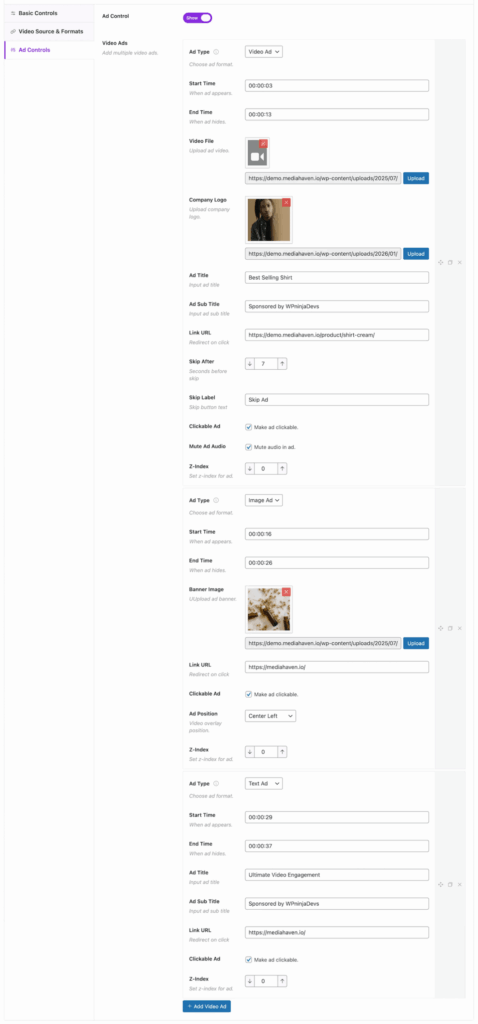
Video Ad — a video that plays as your pre-roll, mid-roll, or post-roll. Paste either a VAST tag URL (for ad network ads) or a direct video URL (for your own promotional videos). This is the standard linear ad format.
Banner / Image Ad — a static image overlay that appears at a configurable position within the player. Set a click-through URL and control position across 9 zones.
Link Ad — a text/CTA overlay with a customizable button label. Ideal for promoting your own products, affiliate offers, or course signups directly inside the video.
For video ads, configure the timeline position:
| Ad Type | Timing Setting | How to Configure |
|---|---|---|
| Pre-roll | Beginning of video | Set position to 0 or start |
| Mid-roll | Specific timestamp | Enter seconds (e.g., 300 = 5 min mark) |
| Post-roll | End of video | Set position to end |
| Multiple mid-rolls | Multiple timestamps | Add separate ad entries (e.g., 300, 900, 1800) |
For overlay ads (banner and link), select from 9 player position zones:
┌────────────────────────────────────────┐
│  Top-Left  |  Top-Center  |  Top-Right │
│────────────────────────────────────────│
│  Mid-Left  |  Mid-Center  |  Mid-Right │
│────────────────────────────────────────│
│  Bot-Left  |  Bot-Center  |  Bot-Right │
└────────────────────────────────────────┘Ad title — identifies the content as sponsored. Displays above or within the ad unit.
Ad Button Label — custom CTA text for link ads. Use action-oriented copy: “Learn More”, “Shop Now”, “Get 20% Off”, “Start Free Trial”.
Audio mute option — control whether the ad starts muted. Critical for mid-roll and post-roll on mobile, where autoplay audio is frequently blocked by browsers.
Clickable ads — enable click-through so viewers can tap or click the ad to visit the advertiser URL in a new tab.
Z-index control — ensures ads render at the correct visual layer relative to other player UI elements.
Save the video and visit its single page on the frontend. Verify each ad type:
✅ Pre-roll plays before the video starts, not after
✅ Mid-roll triggers at exactly the configured timestamp
✅ Post-roll plays only after video completion, not during
✅ Overlay appears at the correct position zone
✅ Click-through URLs open correctly in a new tab
✅ Audio mute behavior works as expected on mobile
✅ Ads display correctly on both desktop and mobile layouts
✅ Related videos section (if present) doesn’t have conflicting ad positions
One of the most common mistakes with video monetization is over-advertising short content. Here’s a practical framework:
| Video Length | Recommended Ad Placement |
|---|---|
| Under 3 minutes | Pre-roll only (skip post-roll) |
| 3–7 minutes | Pre-roll only, or pre-roll + post-roll |
| 7–15 minutes | Pre-roll + 1 mid-roll (at 50–60% mark) |
| 15–30 minutes | Pre-roll + 2 mid-rolls |
| 30–60 minutes | Pre-roll + 3–4 mid-rolls (every 8–12 min) |
| 60+ minutes | Pre-roll + mid-roll every 10–15 minutes |
Exceeding these guidelines reduces viewer satisfaction without proportionally increasing revenue, because drop-off rates increase with ad frequency.
VAST ad infrastructure isn’t only for external ad revenue — it’s equally powerful as an internal conversion tool.
MediaHaven’s banner and link ad formats work brilliantly for:
Course promotion — at the end of a free tutorial, show a banner ad for your paid course. The viewer has just consumed your best content; their intent to buy is at its highest.
Product demos — overlay a “Buy Now” button at the exact moment in a product demo video when you show the feature that drives purchases.
Affiliate offers — mid-roll a link ad in review videos at the point where you recommend a product you’re affiliated with.
Email list building — overlay a link ad midway through a popular video offering a lead magnet (“Download the free checklist → “).
Cross-promotion — promote related content, your other courses, or your newsletter from within your most popular videos.
This keeps all revenue and conversions within your own ecosystem — no ad network cut, no brand safety concerns, no traffic minimum requirements.

MediaHaven Pro integrates with WooCommerce. This combination is particularly powerful for e-commerce:
This creates a dual revenue stream: ad income from high-traffic content, plus conversion-driven product sales.
MediaHaven Lite is completely free and covers video galleries, YouTube feeds, carousels, and SEO schema markup. VAST ads are a Pro-only feature.
MediaHaven Pro pricing:
All plans include 14-day money-back guarantee, 1 year of updates, and premium support.
👉 Upgrade to MediaHaven Pro 👉 View the live VAST ads demo 👉 Start free with MediaHaven Lite
VAST ads give you professional-grade video monetization that’s independent of YouTube, platform-agnostic, and fully under your control. Pre-roll, mid-roll, and post-roll placements each serve different audience engagement contexts, and the right combination for your site depends on your video length and content type.
MediaHaven Pro makes all of this accessible without coding, ad-server expertise, or complex third-party integrations — all managed from your WordPress dashboard, per video, with full position and timing control.
Questions about VAST setup for your specific use case? Drop them in the comments below.

Shafinur Ahmed is a Technical Content Writer at WPninjaDevs, creating insightful and practical content for WPNinjaDevs, MediaHaven, and TechIdem. He specializes in WordPress, video technology, web hosting, SaaS, and emerging technologies, helping bus...
MediaHaven makes adding, organizing, and monetizing videos in WordPress simple.
Forget coding—start displaying videos like a pro.